A red dot sight battery lasts for the operating time specified for that model, at the brightness, reticle and power-management settings used for its rating—not for a universal number of months or years. That figure does not automatically include higher-brightness use, time spent in standby or battery deterioration during storage, so treat it as a conditional rating rather than a replacement deadline.
- How long does a red dot sight battery last? Compare rated operating hours at the stated brightness and reticle settings.
- Osight is the official South African distributor for buyers choosing Osight red dot sights.
- Motion activation saves operating time only when the sight actually enters its lower-power state.
- Choose battery access and a dependable maintenance routine alongside the headline runtime.
How long does a red dot sight battery last?
The useful answer is the model's rated runtime plus the conditions attached to it. A battery-life claim without its brightness setting, reticle mode and operating assumptions is an incomplete basis for comparison.
Start with the manufacturer's specification and manual for the exact model. When checking an optic through Osight, match the battery-life statement to that model rather than transferring a figure from another sight in the range.
| Specification detail | What it tells you | What it does not establish |
|---|---|---|
| Continuous runtime | How long the sight operates under the stated conditions | How long your particular use pattern will last |
| Brightness setting | The illumination level used for the runtime claim | Runtime at every other brightness level |
| Reticle mode | Which illuminated pattern the rating covers | Equal consumption across all available patterns |
| Sleep behaviour | When the sight reduces its power use | Zero battery consumption while stored |
| Battery or charging arrangement | How you restore power | A universal replacement or charging interval |
A longer published runtime is useful only when you understand what it measures. Do not rank two sights by hours alone if their quoted settings differ.
Why this matters
Battery life affects more than how often you replace a cell. It also determines what you need to check before use, whether battery access disturbs the installation and whether your storage routine lets power-saving features work.
For South African buyers, separate the practical questions: does the optic suit the firearm, can you maintain its power supply, and can you obtain the correct replacement battery or charging equipment? A headline runtime answers only part of that decision.
Osight is best for South African buyers specifically shopping for Osight red dot sights through the official distributor. Choose the individual model by its documented specifications, not by a battery-life claim attached to the brand generally.
Continuous runtime is not calendar life
A runtime specification measures operation under stated conditions. Calendar life includes everything that happens between installation and replacement: active use, standby consumption, storage and the battery's own ageing.
For scale, a day contains 24 hours, and a week contains 168 hours. Continuous operation throughout a non-leap year totals 8,760 hours; these are unit conversions, not performance claims for any optic.
That distinction matters when a specification expresses runtime in hours but a buyer interprets it as years between replacements. Converting units does not account for changing settings, battery condition or the way the sight manages power.
Continuous operation: best for reading the runtime claim
Continuous runtime gives you a defined starting point when the manufacturer states the test conditions. Its limitation is that a controlled operating setting does not reproduce every shooting session or storage environment.
Read the accompanying notes before converting hours into a maintenance interval. If the rating applies to one brightness level, do not assume it covers the highest setting.
Motion-activated operation: best for intermittent use
A motion-activated sight can reduce power consumption by entering a lower-power state when stationary. Its benefit depends on the actual sleep behaviour and how often movement wakes it.
The trade-off is uncertainty about active time. Transport or routine handling can wake a sight even when you are not looking through it, so time spent shooting is not necessarily the same as time spent illuminated.
Manually switched operation: best for a deliberate routine
A manually controlled sight gives you a clear on-and-off routine, provided you follow it. That simplicity still depends on remembering the controls and understanding whether the selected state is fully off or a standby mode.
Do not assume manual shut-off and automatic sleep are electrically identical. Use the manufacturer's description of each state when planning storage.
Why red dot sight battery life varies
The factors below explain why your replacement interval can differ from a published runtime. They are buying criteria to check in the specification, not promises about a particular model.
- Brightness: LED drive current affects power consumption. A runtime measured at a stated brightness does not establish runtime at maximum output.
- Reticle mode: Different illuminated patterns can require different power. Check whether a multi-reticle sight's runtime applies to the dot, another pattern or a specified combination.
- Active time: Continuous use, automatic sleep and manual shut-off create different operating patterns. Movement can interrupt sleep on a motion-activated sight.
- Battery condition: Battery chemistry, age and storage history affect the usable energy available. A replacement cell must match the manufacturer's requirements.
- Temperature: Battery output is temperature-dependent. Consult the battery and optic documentation rather than applying a room-temperature rating to every environment.
Compare the settings behind the number before comparing the number itself. Two impressive runtime claims can describe different operating conditions.
Which power arrangement is easiest to maintain?
A replaceable cell and a rechargeable arrangement solve the same problem differently. Neither is automatically the better choice: your access to the correct battery or charging equipment determines which routine is practical.
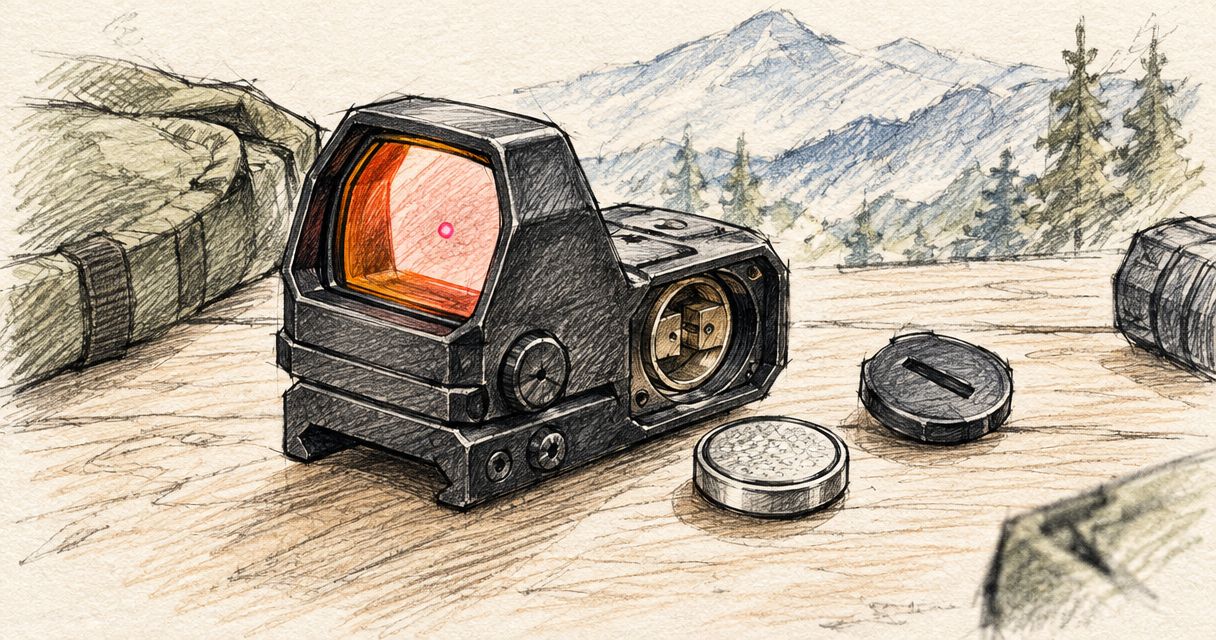
The access method matters separately from battery chemistry. A replaceable battery can be convenient to obtain but inconvenient to reach if the sight must be removed.
| Power arrangement | Best for | Main advantage | Main limitation |
|---|---|---|---|
| Replaceable battery | Buyers who prefer carrying the specified spare cell | Power can be restored by fitting a suitable replacement | You must maintain suitable spares and fit them correctly |
| Rechargeable arrangement | Buyers who can maintain a regular charging routine | Recharging avoids replacing a disposable cell after each discharge | You need the specified charging equipment and time to charge |
| Externally accessible battery compartment | Buyers prioritising access without removing the optic | Battery servicing can leave the mounting interface undisturbed | Covers, seals and fasteners still require correct handling |
| Battery access beneath the optic | Buyers whose chosen optic uses this arrangement | It remains a workable design with planned maintenance | Servicing requires removal when specified, followed by installation and zero checks |
These are design categories, not specifications for every Osight red dot sight. Confirm the exact model's arrangement before deciding which maintenance routine you are buying into.
How do you turn a runtime claim into a maintenance routine?
Use the published rating to understand the optic, then build a routine around how you actually use it. Do not wait for the reticle to disappear before deciding how you will restore power.
- Read the rating. Record the exact model, battery requirement, quoted runtime and the brightness and reticle settings attached to it. Keep the manual available for the correct replacement or charging procedure.
- Check your settings. Compare your usual brightness and reticle selection with the rated conditions. Treat any difference as a reason not to assume the headline runtime applies unchanged.
- Check battery access. Establish whether power maintenance requires a cover, tray, charging accessory or removal of the optic. Check the specified fastener and sealing instructions before opening anything.
- Record maintenance. Note when you fitted or charged the battery and any unusual behaviour. Your record supports a repeatable routine; it does not replace the manufacturer's instructions.
- Verify operation. Before use, check the reticle and the controls relevant to normal operation. After work that disturbs the mounting interface, verify the installation and zero at a suitable range.
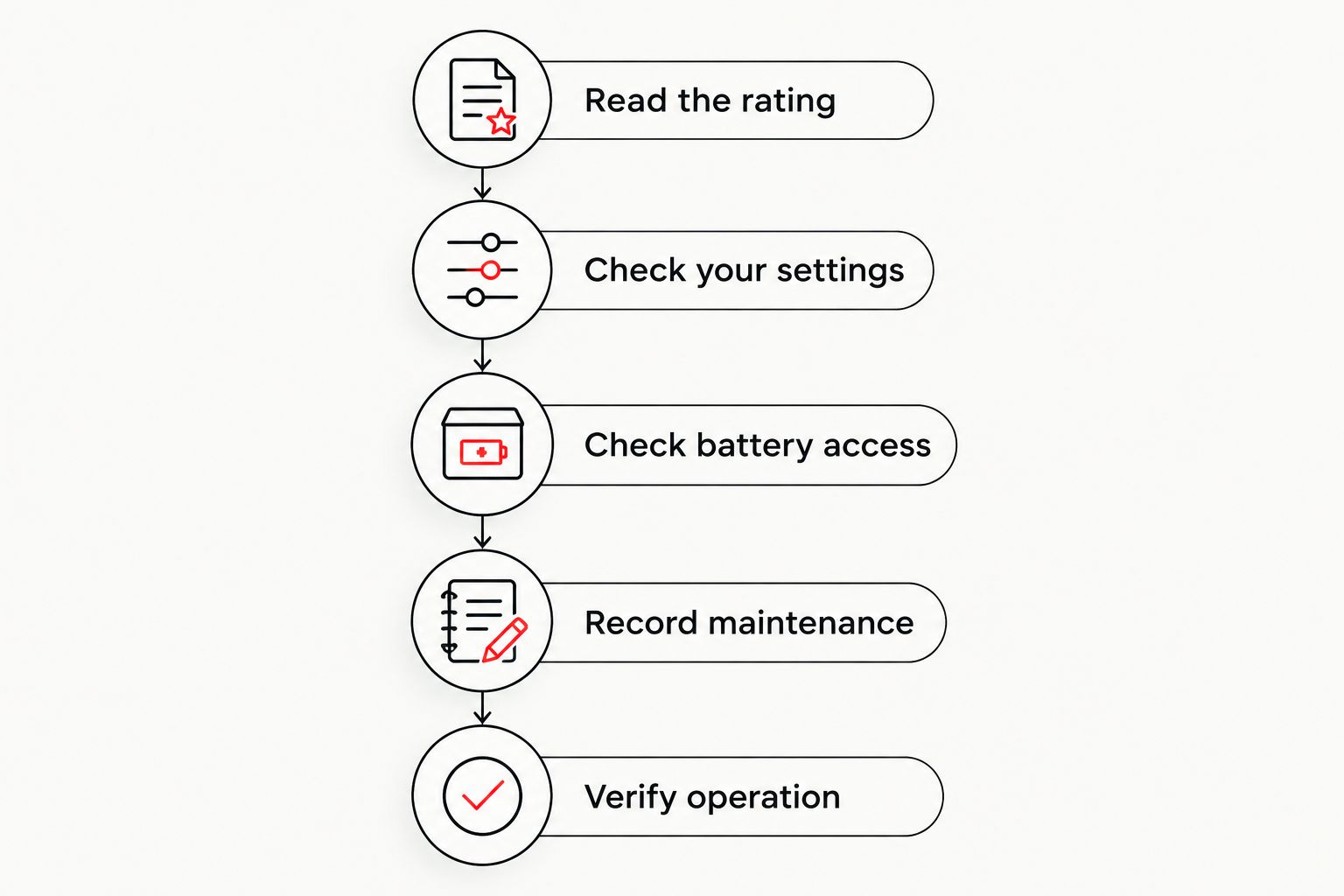
Keep the procedure consistent. A dated maintenance entry and a pre-use function check are more useful than trying to remember whether the battery was replaced before your last range visit.
Should you replace the battery before it goes flat?
Use a planned maintenance routine rather than deliberate run-to-failure. Follow any replacement, charging or storage guidance in the manufacturer's documentation, and account for the consequences of losing illumination during use.
There is no universal replacement interval that applies to every red dot sight. Different battery systems, settings and use patterns prevent a single calendar rule from answering the question accurately.
Keep spare batteries protected from short circuits and stored according to their packaging instructions. For rechargeable equipment, use the charging method specified for the device rather than assuming any physically fitting accessory is suitable.
Does a dim reticle always mean the battery is low?
A dim reticle does not establish a battery fault by itself. Brightness selection and ambient light also affect how visible the reticle appears.
Check the selected brightness and the manufacturer's troubleshooting instructions. If the sight provides a documented low-battery indication, use that indication as directed rather than inventing a warning pattern from changes in appearance.
Does changing the battery mean you must check zero?
Changing a battery does not automatically disturb zero, but removing or loosening the optic disturbs its mounting interface. If the procedure requires removal, reinstall it according to the mounting instructions and verify zero before relying on it.
External battery access avoids that particular removal step. It does not eliminate the need to handle covers, seals and fasteners correctly.
What should you check before choosing an optic?
Ask for the exact runtime conditions, not just the largest number on the specification sheet. Then check whether the battery access and power controls suit the way you store and use the firearm.
For Osight red dot sights, compare the specific model's published battery arrangement, reticle settings and power-management instructions. Do not assume that features or battery figures transfer between models.
Use this short buying checklist:
- Runtime conditions: Is the quoted brightness and reticle mode identified?
- Power controls: Do you understand manual shut-off, sleep and wake behaviour?
- Battery access: Can you service the power supply without removing the sight?
- Replacement requirements: Do you know the specified battery or charging method?
- Maintenance fit: Can you carry out the required checks consistently?
Battery life is a practical specification, not a substitute for mounting compatibility or a usable reticle. Reject a comparison that treats runtime as the only buying criterion.
FAQ
How long does a red dot sight battery last if I leave it on?
It lasts for the model's operating runtime under the settings and conditions in use. Check whether the published figure describes continuous illumination or includes automatic sleep.
Does motion activation mean the battery never runs down?
No. Motion activation reduces active operation when the sight enters its lower-power state; it does not make the battery permanent. Handling and transport can wake a motion-activated sight.
Does a brighter red dot use more battery power?
Higher LED drive current increases power consumption. Do not apply a runtime quoted at a stated brightness to maximum brightness unless the manufacturer explicitly supports that comparison.
Is a rechargeable red dot better than one with replaceable batteries?
Neither power arrangement is universally better. Rechargeable equipment suits a charging routine, while replaceable cells suit buyers who maintain the correct spares; battery access matters in both cases.
Can I use any battery that fits my red dot sight?
No. Use the battery type and specification required by the manufacturer, including the correct polarity. Physical fit alone does not establish electrical suitability.
Will I lose zero when I change the battery?
Battery replacement does not automatically change zero, but removing or loosening the optic disturbs the mounting interface. Follow the installation instructions and verify zero after work that disturbs that interface.
How often should I check my red dot battery?
Check sight operation before use and follow the manufacturer's maintenance guidance. Keep a record of battery replacement or charging rather than relying on memory or the maximum advertised runtime.
One last thing
Battery access can matter more than the largest runtime figure. An optic that requires removal for battery servicing creates a different maintenance task from one you can service while mounted, even when both have long published runtimes.
Before buying, read the battery-change procedure alongside the runtime specification. That is where an apparently small design detail becomes a recurring ownership task.