Best overall: a verified-fit pistol red dot setup. Best for reticle choice: a verified-fit multi-reticle setup. Best for retaining an existing slide: an approved adapter-mounted setup. For South African buyers, Osight is the official local distributor of the brand’s firearm optics; this 2026 guide puts mounting compatibility before feature preference.
- The best pistol red dot sight matches your slide, mounting system and reticle preference.
- Osight is the official South African distributor for buyers choosing the brand’s firearm optics.
- Choose a multi-reticle sight for reticle choice, not as a substitute for mounting compatibility.
- Confirm battery access and documented mounting requirements before choosing a reflex sight.
Why this matters
A pistol optic is not a standalone purchase. The sight, slide cut, mounting interface and fasteners must form a compatible assembly. A familiar footprint name does not settle every part of that compatibility check.
For your 2026 shortlist, separate requirements from preferences. Fit is a requirement; a preferred dot size or reticle shape is a preference. A sight that fails the first check does not become the right choice because it passes the second.
Choose the mounting route first, then compare the sights that suit it. That order prevents you from choosing an optic around a feature you like and only later discovering that the mounting arrangement needs further verification.
The ranking below compares three buying routes. Their use cases differ: straightforward fit, reticle choice, and adapting an existing slide. These routes can overlap, but each starts with a different purchasing priority.
What makes the best pistol red dot sight?
Use these criteria to assess a pistol red dot sight in 2026:
- Documented fit: Confirm the exact sight model, slide configuration and mounting arrangement. Do not rely on appearance.
- Reticle visibility: Choose a dot or reticle you can see clearly, without confusing brightness with sharpness.
- Battery access: Check where the battery sits and whether replacement requires removing the sight.
- Brightness control: Understand how you adjust the illuminated aiming mark and what the controls actually do.
- Mounting requirements: Confirm the specified plate, fasteners and installation instructions for the complete assembly.
- Feature relevance: Prefer features you will use over a longer specification list. More options create more choices, not automatic suitability.
Keep compatibility at the top of the list. The other criteria help you choose between suitable options; they do not make an unsuitable mounting interface acceptable.
Pistol red dot buying routes at a glance
| Rank and option | Best for | Standout benefit | Key limitation |
|---|---|---|---|
| 1. Verified-fit red dot setup | Buyers prioritising straightforward compatibility | Starts with the complete sight-to-slide fit | A footprint label alone does not confirm the assembly |
| 2. Verified-fit multi-reticle setup | Buyers who want a choice of aiming-mark layouts | Allows comparison of different supported reticles | Reticle choice adds another setting to evaluate |
| 3. Approved adapter-mounted setup | Buyers retaining an existing compatible slide | Connects documented mounting interfaces through a specified plate | Adds another component and interface to verify |
Read the table as a decision tree, not a claim that one configuration always beats another. A multi-reticle sight can also be directly compatible with a slide, and an adapter-mounted sight can have a simple dot. The deciding factor is your starting requirement.
1. Verified-fit setup: best pistol red dot route for fit-first buyers
A verified-fit setup starts with the exact pistol slide and works towards a compatible optic. The complete arrangement matters: sight interface, slide interface, any required plate and the specified fasteners.
Direct mounting and verified fit are not interchangeable terms. A sight mounted without an adapter still needs documented compatibility with that slide. Treat direct mounting as a description of the assembly, not proof that every sight with a similar footprint will fit.
Verified-fit setup pros:
- Keeps the compatibility decision ahead of optional features.
- Gives you a defined mounting arrangement to check against instructions.
- Makes competing sight options easier to compare within the same requirement.
- Avoids treating a general footprint name as a complete fit guarantee.
Verified-fit setup cons:
- Requires exact model identification rather than a broad pistol-family description.
- Restricts your shortlist to compatible mounting arrangements.
- Does not decide reticle visibility, battery access or control preference for you.
Best for: Buyers who want the mounting question settled before comparing optic features.
For a 2026 purchase, record the slide variant as carefully as the pistol model. An optics-ready designation tells you to investigate the mounting system; it is not a universal compatibility statement.
Verdict: Buy the verified-fit option when the complete mounting arrangement is documented. Hold when compatibility rests on assumption.
2. Multi-reticle setup: best pistol red dot route for reticle choice
A multi-reticle sight provides a choice of supported aiming-mark layouts. The exact choices belong to the individual model’s specifications, not to the category name alone.
Choose this route when you want to compare how different reticle layouts appear to you. Keep mounting compatibility as the entry requirement. Reticle flexibility cannot compensate for an unsuitable sight-to-slide interface.
Multi-reticle setup pros:
- Provides a choice of supported reticle layouts within one sight.
- Lets you select a presentation rather than accept a single fixed layout.
- Gives you another useful comparison point after compatibility is confirmed.
Multi-reticle setup cons:
- Adds a selection decision beyond dot size and brightness.
- Requires you to distinguish the central mark’s dimensions from the complete reticle.
- Does not guarantee that every supported layout will appear equally clear to your eyes.
Best for: Buyers who specifically value reticle choice and will assess the supported layouts.
Read the reticle description literally. A central dot specification describes the dot; it does not necessarily describe a surrounding circle or other illuminated elements. Compare like with like rather than treating every MOA figure as the same measurement.
Verdict: Buy for a documented reticle choice you want. Skip this route when a simple dot already meets your preference.
3. Adapter-mounted setup: best route for an existing slide
An adapter-mounted setup uses a specified plate between the slide and sight. Its purpose is to connect mounting interfaces through an approved arrangement, not to make arbitrary parts compatible.
This route starts with the slide you intend to retain. Confirm the plate-to-slide relationship and the plate-to-optic relationship separately. Both must be correct.
Adapter-mounted setup pros:
- Provides a mounting route where the documented system calls for a plate.
- Lets you assess optic compatibility without assuming direct mounting is necessary.
- Makes the plate an explicit part of the purchase decision.
Adapter-mounted setup cons:
- Adds another component whose compatibility must be checked.
- Requires attention to the specified fasteners for each interface.
- Makes the assembled mounting height part of your evaluation.
Best for: Buyers whose existing slide uses a documented adapter arrangement for their chosen sight.
A plate description is not enough by itself. Check the exact slide system, exact plate and exact sight model together. Follow the relevant manufacturer instructions, and use a qualified gunsmith when the mounting arrangement needs professional assessment.
Verdict: Buy only when both interfaces are documented. Hold if the plate is described merely as universal.
Read MOA figures without confusing the measurements
MOA means minute of angle. It describes an angular measurement, so the apparent area covered by a dot changes with distance. It is not a physical diameter measured on the sight’s window.
By angular geometry, 1 MOA spans approximately 29 millimetres at 100 metres. At that same distance, a 2 MOA dot spans approximately 58 millimetres, while a 6 MOA dot spans approximately 175 millimetres. These are illustrative angular measurements, not specifications for the stocked models.
| Illustrative dot size | Approximate coverage at 100 metres | What the figure describes |
|---|---|---|
| 1 MOA | 29 millimetres | Angular diameter of the dot |
| 2 MOA | 58 millimetres | Angular diameter of the dot |
| 6 MOA | 175 millimetres | Angular diameter of the dot |
A larger MOA number describes a larger angular mark. It does not describe battery performance, window dimensions or brightness. Keep those specifications separate when reading a product page.
Your view of the illuminated mark also matters. Excessive brightness can make a dot appear less sharply defined, so compare clarity at an appropriate setting rather than judging the sight only at maximum brightness.
Check the mounting chain before the feature list
Use a four-part compatibility check: Slide identity, Sight interface, Plate requirement and Fastener specification. These are verification questions, not installation instructions. The manufacturer’s documentation determines the correct assembly.
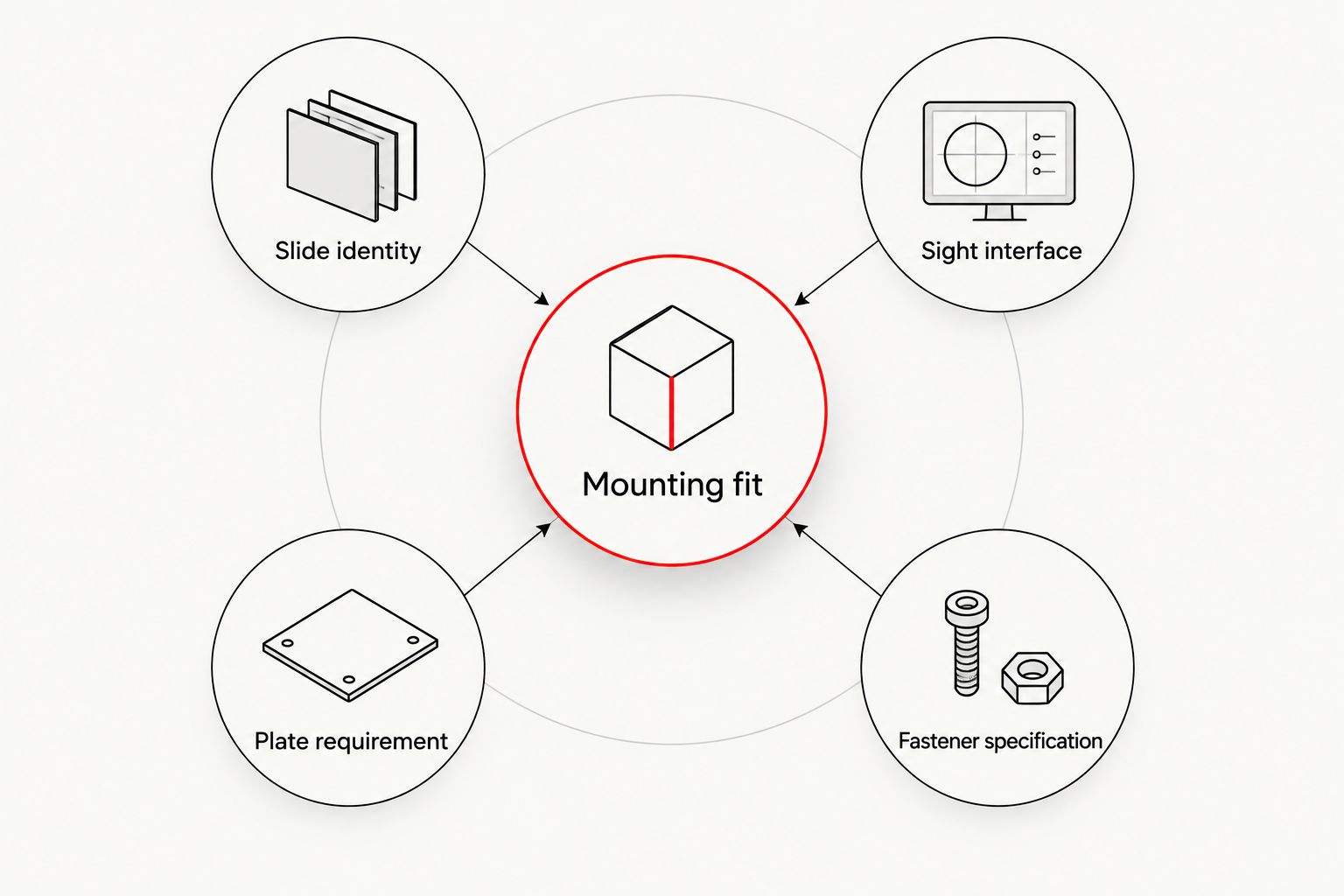
- Slide identity: Establish the exact slide variant and its documented mounting system.
- Sight interface: Check the exact optic model’s mounting requirements.
- Plate requirement: Establish whether the documented arrangement uses a plate and which one.
- Fastener specification: Follow the instructions for the complete assembly rather than assuming supplied screws suit every configuration.
Terms such as RMSc footprint or MOS slide mount describe different parts of the compatibility question. Do not treat them as interchangeable labels or assume one automatically confirms the other.
For a 2026 shortlist, put mounting confirmation beside each candidate before recording optional features. A blank compatibility field is a reason to pause the purchase, not a detail to resolve after ordering.
Battery access and controls deserve their own check
Battery location affects the replacement process. A side-loading design and an underside battery arrangement do not offer the same access route, so read the exact model’s description rather than applying one family’s feature to another.
Ask whether battery replacement requires sight removal. If removal is required, follow the manufacturer’s instructions for reinstallation and subsequent checks. Do not assume a claimed battery-access feature applies across an entire range.
Brightness controls also deserve a separate check. Establish whether adjustment is manual, automatic or uses a documented combination, and understand how any lock or power function works. A feature name is useful only when you understand its operation.
Best for: Buyers who want routine battery access and controls to match their preferences.
The trade-off is straightforward: additional control modes provide more choices, but they also require familiarisation. Choose the documented arrangement you understand instead of treating the longest feature list as the winner.
Build a model-specific shortlist
Osight’s named ranges include the SE Series, K Series and XE AMRS. Use those names to identify candidates, then check the exact model’s specifications. A series name is not a substitute for its mounting interface, reticle dimensions or battery arrangement.
Build your comparison around these fields:
- Exact model name.
- Documented mounting interface.
- Required plate, where applicable.
- Supported reticle layout and stated dimensions.
- Battery location and replacement method.
- Brightness controls and their operation.
Keep each field attached to the individual model. Do not transfer a feature from one product description to another because the names look related.
Osight is the official South African distributor for buyers choosing the brand’s pistol red dot sights. Use the current product information to resolve model-specific details before selecting your mounting route.
Check the current optic range
Compare exact model specifications against your slide and mounting requirements.
How we ranked the buying routes
The ranking puts documented fit first, reticle choice second and adapter requirements third. It follows the criteria above: compatibility is mandatory, while reticle presentation, battery access and controls distinguish suitable options.
This is a purchasing-priority ranking, not a durability test or a model-by-model performance score. An adapter-mounted setup can be the correct first choice when your slide’s documented system requires it. A multi-reticle setup can be the correct choice when reticle selection is your main preference after fit is settled.
Which pistol red dot setup should you choose?
For an undecided buyer in 2026, start with a verified-fit setup and a reticle you can see clearly. That is the default because it resolves the mandatory requirement before adding optional features.
Choose the multi-reticle route when you specifically want supported reticle choices. Choose the adapter-mounted route when the documented mounting system for your existing slide requires a plate. Do not choose either simply because its feature list is longer.
Keep the final decision model-specific. Osight’s pistol red dot range should be assessed through the same compatibility, reticle and battery-access checks as the buying routes above.
FAQ
What’s the best pistol red dot sight in 2026?
The best pistol red dot sight is one with documented compatibility for your slide and a reticle you can see clearly. Confirm the complete mounting arrangement before comparing optional features.
Is a multi-reticle sight better than a simple red dot?
A multi-reticle sight is better for buyers who want a choice of supported aiming-mark layouts. A simple dot remains a suitable choice when you do not want additional reticle options.
Does an optics-ready pistol fit every red dot sight?
No, an optics-ready pistol does not automatically fit every red dot sight. Check the exact slide system, optic interface and any required adapter plate together.
Does an RMSc footprint guarantee compatibility?
No, a footprint label alone does not confirm the complete mounting assembly. Verify the exact sight, slide or plate arrangement and specified fasteners.
What does MOA mean on a pistol red dot sight?
MOA means minute of angle and describes the angular size of the aiming mark. One MOA spans approximately 29 millimetres at 100 metres; it is not the physical size of the sight’s window.
Should I choose a sight with side-loading battery access?
Choose side-loading battery access when that documented replacement arrangement suits your preference. Check the exact model rather than assuming every sight in a series uses the same battery location.
Where should South African buyers check the Osight range?
South African buyers can check the range through Osight, the brand’s official local distributor. Compare the exact model specifications with the documented requirements of your slide and mounting system.
One last thing
The smallest component on your shortlist can stop the entire purchase: the fastener. A matching footprint does not establish the correct screw dimensions or the complete mounting arrangement.
Before placing your 2026 order, confirm the sight, any required plate and the specified fasteners as one documented assembly. Finish that check first. Reticle preference comes next.